WebP Browser Support in 2026 — and How to Ship a Fallback Anyway
WebP support is effectively universal in browsers now, but browsers are not the only thing that consumes your images. Here is the current support matrix, the places WebP still breaks, and four fallback patterns ranked by how much work they cost you.
The state of support
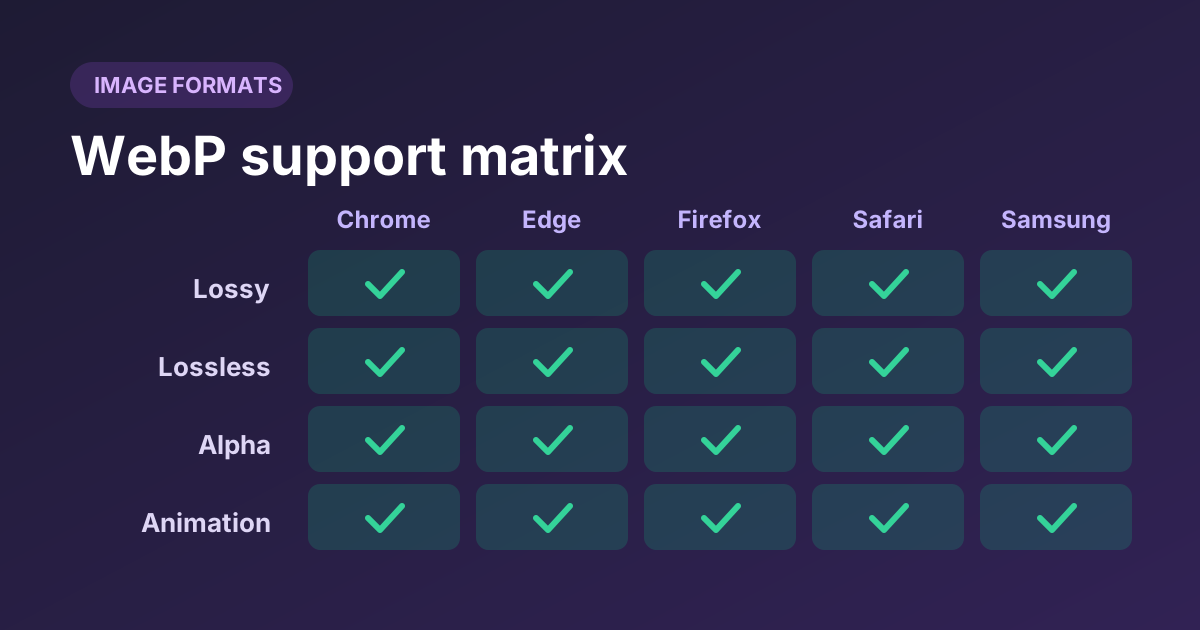
WebP arrived in 2010 and spent the better part of a decade as a Chrome-only curiosity. That history is why so much advice still treats it as risky. It isn't. Firefox added support in 2019, Safari in 2020, and every browser engine shipping today decodes WebP in all its modes.
The format is now a published IETF specification (RFC 9649), which matters more than it sounds: it means WebP is no longer defined solely by one vendor's implementation, and third-party decoders have something authoritative to target.
So the honest 2026 answer to “do I need a fallback?” is: not for browsers. But browsers are not the only thing that will ever open your image, which is the part most support tables leave out.
Feature support matrix
WebP is not one feature but four, and they shipped at different times. All four are now supported everywhere that matters, but it is worth knowing they are distinct — some older decoders handle lossy WebP and choke on lossless.
| Capability | What it covers | Current browsers |
|---|---|---|
| Lossy WebP | Photographic content, VP8-derived predictive coding | Universal |
| Lossless WebP | Flat colour, line art, screenshots | Universal |
| Alpha channel | Transparency, in both lossy and lossless modes | Universal |
| Animation | Multi-frame WebP as a GIF replacement | Universal |
| Canvas encoding | Creating WebP in the browser via toBlob() | Widely supported; this is what our converter uses |
Decoding and encoding are different questions
Every browser can display WebP. Not every browser can create it from a canvas — and support for creating AVIF that way is considerably narrower still. That is why the converter on this site probes the encoder at load time and disables an option it cannot honour, rather than silently handing you a PNG with the wrong extension.
Where WebP still breaks
This is the list that actually matters now, and none of it is about browsers.
| Context | Risk | What to do |
|---|---|---|
| HTML email | High | Email client support is patchy and slow-moving. Use JPEG or PNG in email, always. |
| Social preview scrapers | Medium | Some platforms fetch your og:image with a limited decoder. Serving a JPEG or PNG OG image is the safe choice. |
| Older CMS media libraries | Medium | Upload validation or thumbnail generation may reject WebP. Test before migrating a library. |
| Desktop and office software | Medium | Users who download an image expect to open it. If your audience downloads assets, offer a JPEG. |
| Print and design pipelines | Medium | WebP is a delivery format, not a master format. Keep lossless originals. |
| Server image libraries | Low | PHP GD, ImageMagick and Pillow all handle WebP on current versions. Verify your build. |
| Web browsers | Very low | Nothing needed. |
Four fallback patterns
Ranked by how much work they cost you. Pick one; mixing them creates confusion about which layer owns format selection.
Pattern 1: the picture element
The browser walks the <source> elements in order, takes the first type it supports, and ignores the rest. One file is downloaded, discovery happens in the preload scanner, and there is no server logic at all.
<picture>
  <source srcset="hero.avif" type="image/avif">
  <source srcset="hero.webp" type="image/webp">
  <img src="hero.jpg" width="1600" height="900"
       alt="Descriptive text here"
       fetchpriority="high" decoding="async">
</picture>
Three rules that catch people out: order matters (most preferred first, since the browser takes the first match, not the best); the <img> is required and carries the alt text, dimensions and loading attributes; and type must be exact — a typo means that source is silently skipped forever.
| Pros | Cons |
|---|---|
| No server config · works on static hosting · CDN-cache friendly (one URL per file) · you control the order explicitly | Verbose markup · you must generate and store every variant · awkward to retrofit across a large CMS |
Pattern 2: server-side content negotiation
Keep one URL and let the server decide, based on the Accept header the browser already sends. Markup stays as a plain <img>, which makes this the easiest pattern to retrofit onto an existing site.
<?php
// Serve WebP to browsers that advertise it, JPEG to everything else.
$accept    = $_SERVER['HTTP_ACCEPT'] ?? '';
$wantsWebp = str_contains($accept, 'image/webp');

$path = $wantsWebp ? '/img/hero.webp' : '/img/hero.jpg';

// REQUIRED: tells caches the response depends on the Accept header.
header('Vary: Accept');
header('Content-Type: ' . ($wantsWebp ? 'image/webp' : 'image/jpeg'));
header('Cache-Control: public, max-age=31536000, immutable');
readfile(__DIR__ . $path);
The trap that catches everyone
Omit Vary: Accept and a shared cache will serve a WebP to a client that cannot read it, or a JPEG to one that could have had WebP. Include it and some CDNs key the cache on the full Accept string — which varies wildly — fragmenting your cache into hundreds of entries and collapsing your hit ratio. The fix is to normalise Accept at the edge to a single bit before it reaches the cache key. Our caching guide covers this in detail.
A complete, cached implementation — converting on first request and writing the result to disk — is in our PHP guide.
Pattern 3: let the CDN do it
Most image CDNs will convert and negotiate for you: you upload one high-quality master, and the edge derives formats, sizes and quality per request. Markup stays simple, and you can change the whole strategy without redeploying.
The trade-offs are real, though: a recurring cost that scales with traffic, a dependency on a third party for every image on your site, and cache-invalidation behaviour you do not control. It is an excellent fit for image-heavy commerce and a poor one for a small static site that could ship four extra files instead.
Pattern 4: no fallback at all
Ship WebP as a plain <img src="photo.webp"> and accept that a browser which cannot decode it will show a broken image. In 2026, on a normal consumer-facing website, that browser essentially does not exist.
This is a legitimate choice, and increasingly the common one. It is the wrong choice if your audience includes locked-down corporate environments, if your images get emailed or downloaded, or if you cannot tolerate a broken image on any device you have not personally tested. Keep JPEG or PNG for your og:image regardless.
The anti-pattern: user agent sniffing
<?php
// Don't do this.
$ua = $_SERVER['HTTP_USER_AGENT'] ?? '';
if (preg_match('/Chrome|Firefox|Edge/i', $ua)) {
    $useWebp = true;   // wrong for embedded webviews, wrong for new browsers,
}                      // wrong the moment any UA string changes
User agent strings are unreliable by design — they are heavily spoofed, frozen, and reduced for privacy. Any list you write is a maintenance burden that quietly rots. The Accept header exists precisely so you do not have to do this: the browser tells you what it can decode, accurately, on every request. Use that, or use <picture> and let the browser decide entirely.
Choosing between them
| Your situation | Use |
|---|---|
| Static site or SSG, full control of markup | <picture> |
Existing site, cannot easily change every <img> | Server-side negotiation |
| Image-heavy commerce, many variants per product | Image CDN |
| Small site, modern audience, no email or downloads | WebP only |
| Also want AVIF for the biggest images | <picture> with AVIF first |
| Any situation whatsoever | Not user agent sniffing |
Whichever you pick, you still need the WebP files themselves. The converter on this site will produce a whole batch at once and hand them back as a ZIP, ready to drop next to your JPEGs for a <picture> setup.
Generate your WebP variants
Drop your existing JPEGs and PNGs in, convert the whole batch at quality 80, and download them as a ZIP with matching filenames — exactly what a <picture> fallback needs.