Lazy Loading Implementation: Intersection Observer, Step by Step
The implementation companion to our lazy loading strategy guide. Build a production-grade Intersection Observer loader from scratch: background images, responsive srcset, iframes, decode handling, error fallbacks, and cleanup.
This is the implementation guide. For which images to defer and why — the strategy, the LCP rule, the decision tree — read the companion piece first: Lazy loading strategy.
Native first: what it already covers
Before writing a line of JavaScript, be clear that the browser already does this well for the common case:
<img src="photo.webp" width="1600" height="900"
     alt="Descriptive text" loading="lazy" decoding="async">
That is zero bytes of JavaScript, works with the preload scanner, adapts its trigger distance to connection speed, and degrades gracefully. If this covers your case, stop here. Every line of lazy-loading JavaScript you write is a line you have to maintain, and a way for images to fail to appear at all.
The four real gaps
| Gap | Why native cannot help |
|---|---|
CSS background-image | The loading attribute only exists on <img> and <iframe>. CSS has no equivalent. |
| Custom trigger distance | Native thresholds are internal and not configurable. If you need to load 800 px early, you need your own observer. |
| Non-image work | Initialising a map, starting an animation, or mounting a heavy component when it scrolls into view. |
| Load-completion hooks | Fade-ins, skeleton removal, analytics on view — anything that needs to know when the load finished. |
How Intersection Observer works
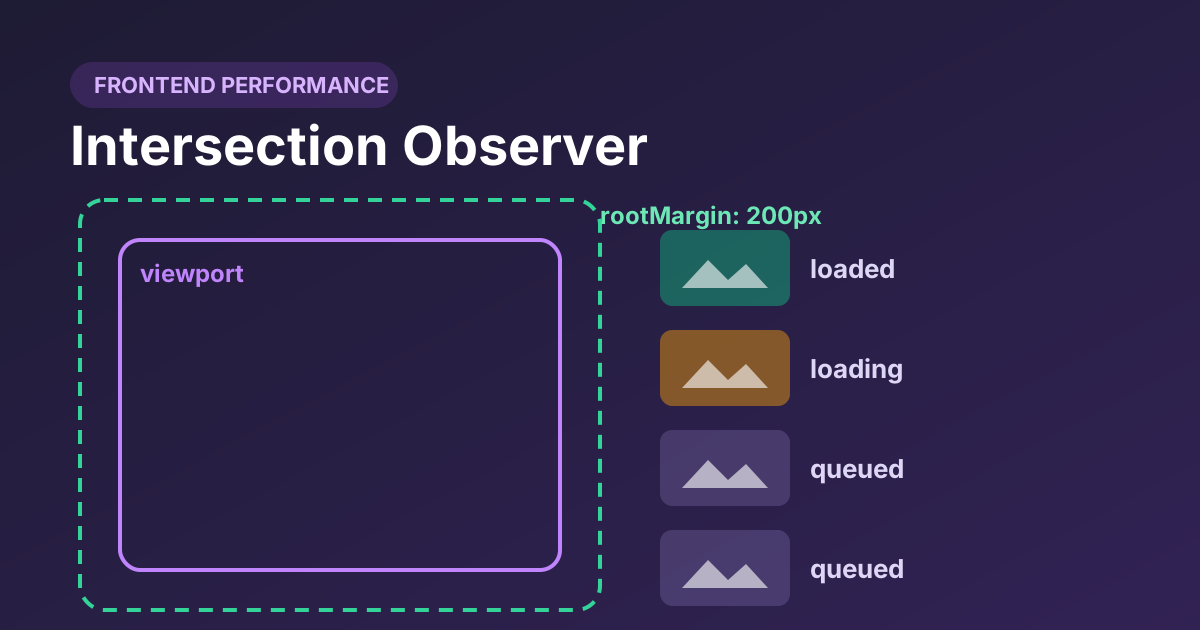
You give the browser a callback and a set of options; it tells you asynchronously when an observed element crosses a visibility threshold. Crucially the intersection computation happens off the main thread, so there is no per-frame layout thrash.
const observer = new IntersectionObserver(callback, {
  root: null,              // null = the viewport
  rootMargin: '200px 0px', // grow the test area 200px above and below
  threshold: 0             // fire as soon as any part intersects
});root— the element to measure against.nullmeans the viewport. Set it to a scrolling container if your list scrolls inside a div.rootMargin— CSS-style margins that inflate or shrink the test area. This is the important one:200px 0pxstarts loading 200 px before the element is visible, which is what prevents pop-in.threshold— how much of the element must intersect.0means “any part”, which is what you want for loading. Values like0.5are for visibility tracking, not loading.
A minimal, correct loader
The smallest version that is not wrong. Note the unobserve — without it the observer keeps watching every element forever.
const io = new IntersectionObserver((entries, observer) => {
  entries.forEach(entry => {
    if (!entry.isIntersecting) return;

    const img = entry.target;
    img.src = img.dataset.src;
    img.removeAttribute('data-src');

    observer.unobserve(img);          // stop watching this one
  });
}, { rootMargin: '200px 0px' });

document.querySelectorAll('img[data-src]').forEach(img => io.observe(img));
This works, but it has three problems in production: nothing happens if IntersectionObserver is unavailable, nothing handles a failed load, and there is no hook for a transition. The next version fixes all three.
The production version
/**
 * Lazy-loads elements carrying data-src / data-srcset / data-bg.
 * Falls back to loading everything immediately where unsupported.
 */
(function () {
  'use strict';

  const SELECTOR = '[data-src], [data-srcset], [data-bg]';
  const MARGIN   = '200px 0px';

  function load(el) {
    // Background images
    if (el.dataset.bg) {
      const probe = new Image();
      probe.onload = () => {
        el.style.backgroundImage = `url("${el.dataset.bg}")`;
        el.classList.add('is-loaded');
        el.removeAttribute('data-bg');
      };
      probe.onerror = () => el.classList.add('is-error');
      probe.src = el.dataset.bg;
      return;
    }

    // img and source elements
    const done  = () => el.classList.add('is-loaded');
    const fail  = () => el.classList.add('is-error');

    el.addEventListener('load',  done,  { once: true });
    el.addEventListener('error', fail,  { once: true });

    if (el.dataset.srcset) {
      el.srcset = el.dataset.srcset;
      el.removeAttribute('data-srcset');
    }
    if (el.dataset.src) {
      el.src = el.dataset.src;
      el.removeAttribute('data-src');
    }

    // Already complete from cache: the load event will not fire again.
    if (el.complete && el.naturalWidth > 0) done();
  }

  const targets = document.querySelectorAll(SELECTOR);

  // No support, or the user prefers everything up front: just load it all.
  if (!('IntersectionObserver' in window)) {
    targets.forEach(load);
    return;
  }

  const io = new IntersectionObserver((entries, observer) => {
    entries.forEach(entry => {
      if (!entry.isIntersecting) return;
      observer.unobserve(entry.target);
      load(entry.target);
    });
  }, { rootMargin: MARGIN, threshold: 0 });

  targets.forEach(el => io.observe(el));

  // Expose a hook so dynamically inserted content can register itself.
  window.lazyObserve = el => io.observe(el);
})();
Four things worth pointing out in that code:
unobservebeforeload. Ordering matters: if the load throws, you still want the element off the watch list rather than retried on every scroll.- The
el.completecheck. If the browser serves the image instantly from cache, theloadevent may fire before your listener is attached, and your fade-in class never gets added. This is the single most common cause of “some images stay invisible”. { once: true }. Cleans the listener up automatically so you are not leaking handlers across a long-lived page.- The
window.lazyObservehook. Infinite scroll and client-rendered views insert images after this script runs. Without a way to register them, they never load.
Lazy background images
This is the most common legitimate reason to reach for JavaScript. The pattern above pre-loads the file with an off-DOM Image() and only applies the CSS once it has arrived — so you never get a half-painted background.
<div class="panel" data-bg="/img/panel-1600.webp"
     style="aspect-ratio: 16 / 9"></div>

<style>
  .panel {
    background: #e5e7eb center / cover no-repeat;  /* placeholder colour */
    transition: opacity .3s ease;
  }
  .panel.is-error { background-color: #fee2e2; }
</style>
The aspect-ratio is doing the same job that width and height do on an <img>: reserving the space so nothing shifts when the background arrives.
If the background is above the fold, do not lazy-load it at all — preload it. A background image is invisible to the preload scanner, so it is already the slowest thing on your page before you defer it further.
Handling srcset and picture
With <picture>, the <source> elements are evaluated when the <img>'s source is set, so you must swap the sources before the img:
function loadPicture(img) {
  const picture = img.parentElement;

  if (picture && picture.tagName === 'PICTURE') {
    picture.querySelectorAll('source[data-srcset]').forEach(source => {
      source.srcset = source.dataset.srcset;
      source.removeAttribute('data-srcset');
    });
  }

  // Setting srcset/src last triggers re-selection across all sources.
  if (img.dataset.srcset) img.srcset = img.dataset.srcset;
  if (img.dataset.src)    img.src    = img.dataset.src;
}
Do not strip the real src. A <img data-src="…"> with no src is invisible to crawlers and to any visitor whose JavaScript failed. Keep a genuine src — a low-resolution placeholder at minimum — and let the script upgrade it. Native loading="lazy" has no such problem, which is another reason to prefer it.
Fading in without layout shift
The trick is to animate opacity only. Animating height, or revealing an element that had no reserved space, reintroduces exactly the layout shift you were avoiding.
img[data-src], img[data-srcset] { opacity: 0; }

img.is-loaded { opacity: 1; transition: opacity .35s ease-in-out; }

img.is-error  { opacity: 1; background: #fee2e2; }

/* The space is reserved by width/height, so opacity is safe to animate. */
img { max-width: 100%; height: auto; }

@media (prefers-reduced-motion: reduce) {
  img.is-loaded { transition: none; }
}
Respecting prefers-reduced-motion costs three lines and matters to people who get motion sickness from page animations.
Five pitfalls
- Forgetting
unobserve. On a page with a thousand images the observer keeps every one of them alive, and every intersection change costs work. Always stop watching an element you have handled. - Missing the cached-load case. If the image completes before your
loadlistener attaches, the event never fires and your fade-in class is never added — the image stays atopacity: 0. Theel.complete && el.naturalWidth > 0check handles it. - No error path. A 404 leaves an empty box with no indication anything went wrong. An
is-errorclass at least lets you show something sensible. - Lazy-loading the LCP image. Everything in the strategy guide applies twice as hard here, because a JavaScript loader defers the image even further than the native attribute does — it has to wait for your script to parse and run first.
- Ignoring dynamically added content. Infinite scroll, tab panels and client-rendered routes all insert images after your setup code ran. Expose a registration hook, or re-scan on insertion with a
MutationObserver.
A closing reality check
Deferring a 3 MB JPEG still downloads 3 MB, just later, and usually at the exact moment the reader is waiting for it. Lazy loading is a scheduling optimisation layered on top of file-size optimisation — not a substitute for it. Convert and resize first; defer second.
Shrink the files before you defer them
Batch-convert your gallery to WebP and cap the width to the largest size you actually display. Then lazy-load what is left.
Open the converter